Godot Town: Claude built a medieval town from one prompt
I gave Claude one prompt and Godot 4.7. About an hour later there was a medieval town with real terrain, a humpback stone bridge, a castle, a crowd of villagers, and chickens it modeled and animated itself.
The usual way to find out whether a game engine can handle a big scene is to read forum threads where people argue about it. This time I asked Claude to build one and find out.
Godot Town (the name took less time than anything else in the project) is a medieval town you can run around in, made with Godot 4.7. Claude built all of it: Claude Opus 5.5, running in Claude Code, from a single prompt, in about an hour. I didn't write a line of code, pick an asset or place a house. It has terrain with real elevation, a humpback stone bridge, a castle on a hill, about 140 houses, 1,500 trees, a crowd of villagers, farm animals and a river you can swim in. Here's a minute of running around it, including a trip through the time-of-day cycle:
One prompt
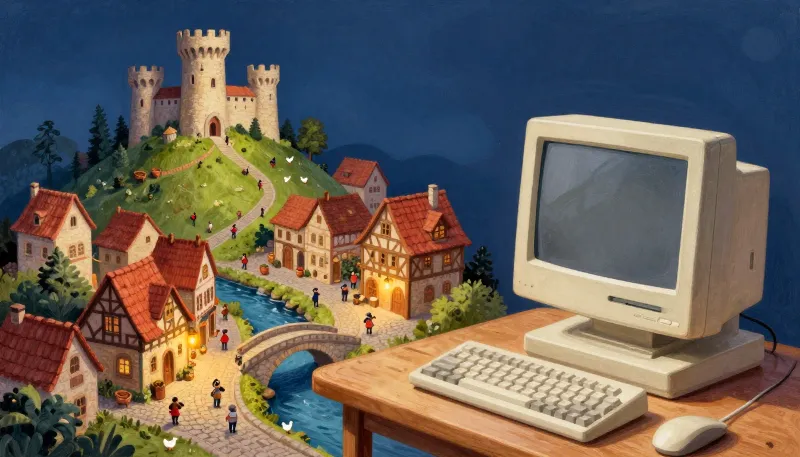
Before this, Claude had built a couple of small test games so I could compare Godot with Stride, and Godot came out ahead. The next question was how far Claude could take it. This is the whole prompt, sent along with a sample image of the look I wanted:
Can you build another game in the folder ‘GodotTown’ where I can run around through a medieval town? Are there stock assets of any kind similar to the Unity Asset Store? If so, some nice buildings and animals would be great. How much can you do - can you create 3D assets on your own and create 3D models that can be rigged and animated? I want to see how the game performs with elevation changes (like running over a curved bridge that bends upward) and I would love to have the ability to jump when pressing the spacebar.
I would like to keep the graphics simple but pretty - similar to the image ‘sample.jpg’ in the folder. I want to see how much we can push the engine and how the game performs.
There were no follow-ups. What's interesting is less the result than how Claude got there, because it worked through the problem the way a developer would:
- It went shopping for art. It checked Poly Haven, Kenney, Quaternius, Poly Pizza and OpenGameArt, settled on Quaternius's free CC0 packs, and scripted the downloads from itch.io itself.
- It looked before it built. It wrote throwaway Godot scripts that loaded the kits headlessly, dumped their structure, and laid the pieces and characters out into contact sheets, so it knew how the walls, roofs, outfits and animation clips actually fit together.
- It ran the game, not just the compiler. It built a benchmark into the game, ran it, saw that a big crowd was the bottleneck, fixed it, and measured again.
- It tested its own work. It added an autopilot that runs the player over the bridge and up the castle road, jumping as it goes, so it could check the physics without anyone at the keyboard.
- It wrote the documentation. The README covers the controls, the benchmark numbers, the architecture and the asset credits.
Over the hour that came to about a hundred shell commands and 28 files written. Everything below is a description of what it made.
Almost nothing is hand-placed
Nearly everything is generated at startup from a seed, so the town comes out the same every run and builds in about 2.5 seconds. main.tscn holds only the environment, the sun, the player, the camera and a few managers. The one hand-designed part is the layout: the river's course, the roads, the two bridges, the square, the castle mound and the pasture.
From there it's built in passes. The terrain is a 400 m heightmap on a 1 m grid, shaped by rolling hills, a ring of hills around the valley, the castle mound, the river channel, smoothed roads, a level square and flat pads for buildings. It ends up as 100 mesh chunks, a HeightMapShape3D for collision, and a mask texture the terrain shader uses to paint cobbles, dirt, paving and muddy banks. Steep slopes turn to rock.
The houses are assembled from the modular pieces of Quaternius's Medieval Village MegaKit: one to three storeys of stone, plaster or timber-frame walls on a 2 m grid, with windows, shutters, a door, corner posts, a tiled roof with the gables facing the street, and sometimes a chimney. The town builder walks along each road and places houses on both sides wherever they fit, flattens a pad for each one, and adds barrels, flowers, ivy and a lantern by the door. Roof, plaster and wood colors vary from house to house.
Twenty thousand pieces, a few thousand draw calls
Building houses out of kit pieces means a lot of pieces: about 20,000 walls, roofs, trees, props and flowers. Drawn as separate nodes, that's at least a draw call each. Instead, Claude wrote a batcher that groups every placed copy by mesh and by 32 m chunk, then turns each group into one MultiMeshInstance3D:
func add(scene_path: String, xf: Transform3D, category := Category.STRUCTURE, variant := 0) -> void:
	var chunk := Vector2i(floori(xf.origin.x / CHUNK_SIZE), floori(xf.origin.z / CHUNK_SIZE))
	for entry in meshes_of(scene_path):
		var mesh: Mesh = entry[0]
		if variant != 0:
			mesh = _variant_mesh(mesh, variant)
		var key := "%d,%d:%d:%d" % [chunk.x, chunk.y, mesh.get_instance_id(), category]
		if not _groups.has(key):
			_groups[key] = {"mesh": mesh, "category": category, "transforms": []}
		_groups[key]["transforms"].append(xf * (entry[1] as Transform3D))
		instance_count += 1
Chunking keeps frustum culling working, since a whole town in one multimesh would never be off screen. The different roof and plaster colors become mesh variants that share vertex data, so tinting a house doesn't break its batch. Small things get a category that turns off their shadows and fades them out with distance: props at 140 m, flowers at 70 m.
Collision skips the scene tree as well. Houses, trees, props and fences go straight to the physics server as about 2,200 shapes on a single body.
The bridge is real geometry
I asked for a curved bridge that bends upward, mostly to see how the engine handles elevation. Claude didn't fake it with a model and a hidden ramp. Both bridges are procedural meshes with an arched cobbled deck (the main bridge rises 4 m), spandrel walls down to an elliptical arch, and parapets, all in the kit's own stone materials so they match the houses. The deck has exact trimesh collision, so the hump in the middle comes from the physics engine. The player is a CharacterBody3D, so the slopes, the bridge deck and every wall are handled the same way.
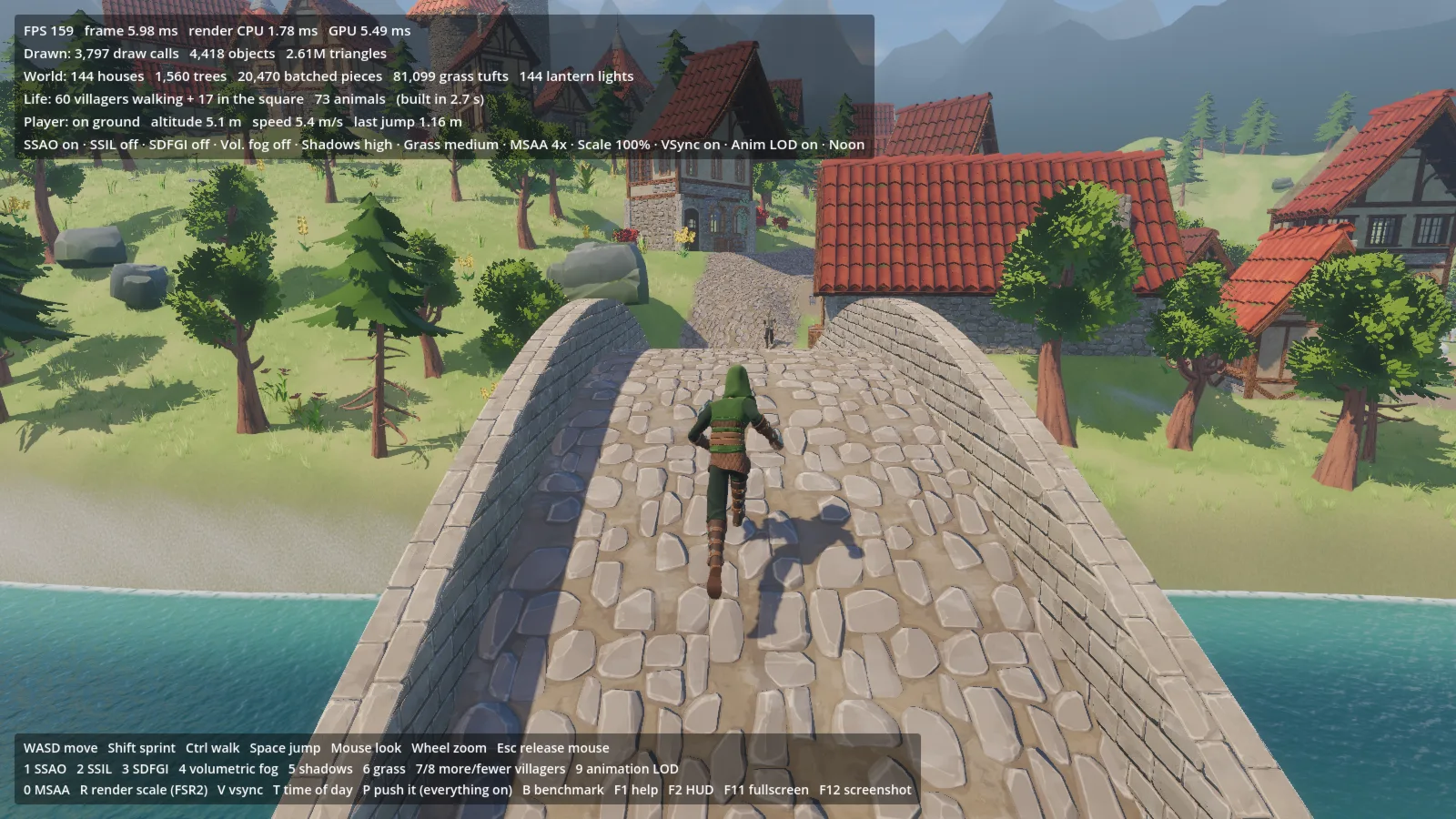
That shot came from Claude's autopilot. Set GODOTTOWN_AUTOPILOT=1 and the bot runs the player from the square over the bridge, and GODOTTOWN_SHOTS=4,7,10 saves screenshots at those times.
The jump got the same attention. It's buffered, it has a little coyote time (it still works 0.12 seconds after you run off an edge), it uses the animation library's start, loop and landing clips, and in the river you swim instead.
The crowd is what costs
I also asked to see how hard the engine could be pushed, so Claude built a benchmark: B runs a 50-second camera flight over the square, the main street, the bridge, the castle and the river, with vsync off. Here are its numbers at 1600×900 on an RTX 5070:
| Setup | Average | 1% low | Draw calls |
|---|---|---|---|
| Default: SSAO, 8K soft shadows, 4× MSAA, 60 walkers | 188 FPS | 135 FPS | ~4,600 |
| Default + 400 walking villagers | 134 FPS | 84 FPS | ~6,300 |
| Everything: + SSIL, SDFGI, volumetric fog, dense grass, 400 walkers | 122 FPS | 80 FPS | ~6,500 |
The GPU sits around 5 to 6 ms in all three. When Claude first ran the benchmark with 400 villagers, it got 77 FPS, and the time was going to the CPU, not the GPU. Moving a villager turned out to be expensive, because each new transform ripples through a skeleton and a dozen skinned meshes (a villager is an outfit, a head, hair and eyebrows, all skinned to one skeleton). So it added an update LOD: villagers further from the camera move and animate less often, and catch up on the time they skipped when they do:
## Distance (m) -> update the skeleton every this many frames.
const LOD_TIERS := [[25.0, 1], [50.0, 2], [90.0, 4], [INF, 8]]
	if _frame % every != 0:
		return
	var step := minf(_pending_delta, 0.5)
	_pending_delta = 0.0
	if mode == Mode.WALK:
		_walk(step)
	visible = distance < HIDE_DISTANCE
	if visible and (on_screen or not Population.animation_lod):
		model.animation.advance(step)
Villagers off screen only update every tenth frame and don't animate at all. That took 400 villagers from 77 FPS to 134. The 9 key turns it off and on, so you can watch the difference live.
The villagers walk a graph made from the roads, the square crossings and the bridges, each keeping to their own side of the street and now and then stopping for a chat. Others stand talking in groups in the square or sit on its benches.
The chickens are generated, not downloaded
My prompt asked whether Claude could create its own 3D models, rigged and animated. Its answer was the chickens. Every other creature in the town comes from an asset pack, but there were no chickens in it, so Claude wrote tools/make_chicken.gd. The script builds a low-poly mesh from ellipsoids, cones and cylinders, skins it to a 13-bone skeleton, keys four animations (Idle with head turns, Walk with the head-bob, Peck, and a flapping hop), and exports the result as glTF:
const BONES := [
	# name, parent, rest position relative to the parent
	["root", -1, Vector3(0, 0, 0)],
	["body", 0, Vector3(0, 0.27, 0)],
	["neck", 1, Vector3(0, 0.07, 0.07)],
	["head", 2, Vector3(0, 0.12, 0.03)],
	["tail", 1, Vector3(0, 0.05, -0.12)],
	["wing_l", 1, Vector3(0.1, 0.03, 0)],
	["wing_r", 1, Vector3(-0.1, 0.03, 0)],
	["thigh_l", 1, Vector3(0.05, -0.05, 0)],
	["shin_l", 7, Vector3(0, -0.1, 0.01)],
	["foot_l", 8, Vector3(0, -0.1, 0)],
	["thigh_r", 1, Vector3(-0.05, -0.05, 0)],
	["shin_r", 10, Vector3(0, -0.1, 0.01)],
	["foot_r", 11, Vector3(0, -0.1, 0)],
]
It runs as a headless Godot script (godot --path . -s res://tools/make_chicken.gd) and writes a white and a brown chicken. The files import like any other model, in Godot or in Blender. The chickens scratch around near some of the front doors, the cows, horses, sheep, pigs and llamas live in the pasture, and a pug follows you everywhere.
Knobs for everything
Since the point was to test the engine, Claude put almost every expensive feature on a key.
Rendering toggles. 1 to 4 switch SSAO, SSIL, SDFGI and volumetric fog. 5 and 6 cycle shadow quality and grass density, 0 cycles MSAA, R cycles the render scale with FSR2, and V toggles vsync. Grass density changes how many of each chunk's instances are drawn, so changing it doesn't rebuild anything.
More villagers. 7 and 8 add or remove 50 walkers, up to 800.
Time of day. T steps through morning, noon, golden hour and night. At night the lanterns by the doors light up, all 144 of them.
Push it. P turns on SSAO, SSIL, SDFGI, volumetric fog, dense grass and 400 villagers at once.
A HUD that counts. It shows FPS and frame, CPU and GPU times, draw calls, objects and triangles drawn, plus what's in the world, the player's altitude and the height of your last jump.
What it doesn't do (yet)
- There's no game. No goals, no quests, no one to talk to. You explore, and that's it. That's what I asked for, but it's worth saying.
- There's no sound.
- The sheep, pigs and llamas only came with idle and jump animations, so they hop everywhere.
- It's the same town every time. The seed is an exported variable in the editor, not something you can change from the game.
- There's no export preset, so it runs from Godot itself, not as a standalone executable.
What this says about AI
Game development is a lot more than code. There's art to find and license, kits whose pieces you have to figure out, physics to tune, animation clips to wire up and performance to measure. In this project Claude handled all of it, and when something was slow it found out why and fixed it, the same loop I'd go through myself. My part was one paragraph and a reference picture.
The town isn't a finished game, and I wasn't asking for one. But a playable, benchmarked 3D world from one prompt and an hour of waiting says a lot about where these tools are now. They're no longer limited to finishing a function for you. They can take on whole projects, and that includes game engines.
Running it
The whole project is here: godot-town.zip (289 MB). It's exactly what Claude produced, art included, minus Godot's import cache. Unzip it and run it with Godot 4.7:
cd GodotTown
godot --path .        # play
godot -e --path .     # open the editor
The first launch imports the assets, which takes about a minute. After that the town builds in about 2.5 seconds. Left-click to capture the mouse, WASD to move, Space to jump, and F1 shows the help.
All the art except the chickens, terrain, bridges, castle, grass, water, sky and mountains comes from Quaternius's free packs, which are CC0 (public domain): the Medieval Village, Stylized Nature and Fantasy Props MegaKits, the modular fantasy outfits and base characters, the Universal Animation Library and the farm animals. They're a big part of why a town like this is possible in an hour. If you use them, consider supporting Quaternius.